
The Netzknoten Navigator combines road referencing, map work, coordinate conversion, sharing, and professional data handoff in one application for traffic control companies. GPS locations and map points can become usable German road references, while sections and stationing can be resolved back to physical locations. The result can continue from project preparation into field operations and downstream systems.
What happens when a new work location reaches the office?
A new job rarely arrives in exactly the same format as the previous one.
One tender identifies a German federal road, a section, and a station value. Another customer sends two WGS84 coordinates. A supervisor forwards a screenshot from a mapping application. Somewhere else, an agency document refers to a Netzknoten and expects everybody involved to understand which physical stretch of road that reference describes.
Traffic control contractors deal with this variety every day.
The underlying question, however, remains remarkably consistent: where exactly is the location, and how should that location be represented for the next person in the workflow?
Vextario Netzknoten Navigator is designed around that transition.
A user can begin with GPS, coordinates, or a point selected on the map and resolve the available professional road context. The process also runs in the opposite direction, turning a road reference back into a geographic point.
Instead of treating every new representation as a separate search, the application keeps the location connected to its road-network context.
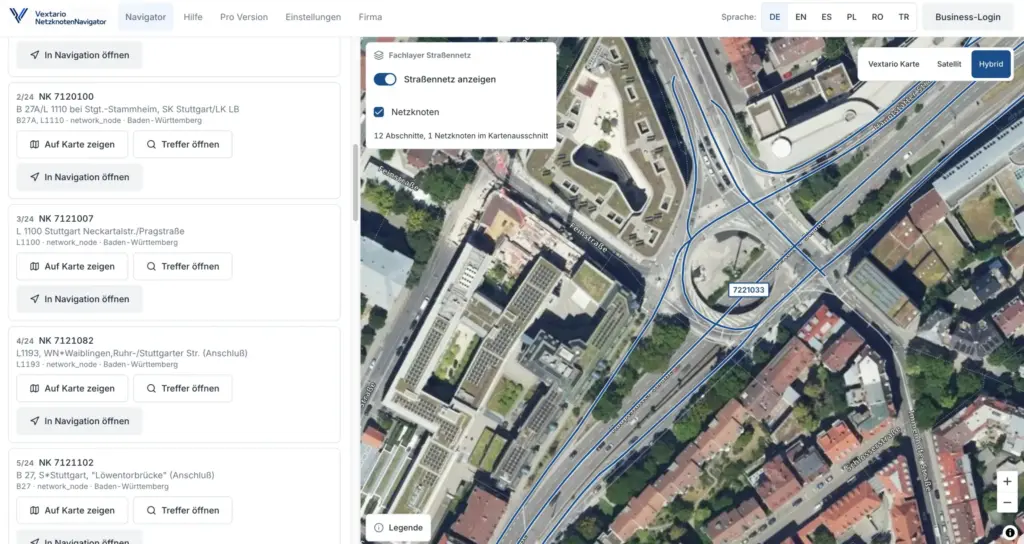
Product page: Vextario Netzknoten Navigator
How does a GPS point become a professional German road reference?
A smartphone can provide latitude and longitude within seconds.
That is often enough for general navigation, but German road operations frequently use additional referencing information. A contractor may need to know not only which named road contains the location, but also the network section, the relevant Netzknoten, and the stationing position inside that section.
Netzknoten Navigator can resolve a geographic point against the available road-network data and return this type of context where the regional source supports it.
The user does not need to understand how an individual state’s road information database stores its internal objects.
Consider a field inspection. A project manager is already standing at the future work zone and needs the road reference for documentation and project preparation. The phone supplies the geographic position. Netzknoten Navigator provides the connection to the formal road model, and an office employee can later continue with the same result.
GPS remains useful. The application simply adds the professional road context that ordinary coordinates do not contain.
How does the workflow operate in reverse?
For many contractors, the reverse transformation is equally important.
A tender or authority document may already contain a formal location, but no convenient map point. The input might consist of a road, section, Netzknoten, station, or a combination of those elements.
Netzknoten Navigator supports bidirectional road referencing.
Where the underlying data allows it, the application can resolve that network reference back into a geographic location.
The project manager can inspect the site on a map. The result can be shared with another employee. A crew can receive the geographic destination needed for navigation without manually interpreting the stationing information beside the road.
This is one reason the product is broader than a Netzknoten lookup utility.
The node is not the destination of the workflow. It is one part of a road location that can continue into other operational steps.
Why does a consistent interface matter across Germany’s regional road-data systems?
Germany’s professional road data is distributed across multiple administrative systems and state-level road databases.
The application may present one interface, but the underlying regional data does not magically become identical.
The scale becomes visible even when looking at a single state road authority. Brandenburg’s Landesbetrieb Straßenwesen currently reports responsibility for more than 8,161 kilometers of federal and state roads, supported by 33 road maintenance depots across the state.
A traffic control company should not need to study a new database architecture every time a project crosses a state border.
That complexity belongs in the product’s data and service layer.
For the user, the workflow remains recognizable: choose or enter a location, retrieve the available road context, inspect the result, and continue with the next operational step.
Regional capabilities can still differ. A particular attribute may be available in one state data set but absent in another. The important point is that these differences are handled explicitly rather than forcing the user to discover them through failed searches.
Which features become available once a road location has been resolved?
The easiest way to understand Netzknoten Navigator is to follow one actual location.
A project manager selects a point on the map. The application resolves the available road context. Road, network nodes, section, and stationing can be reviewed together.
The geographic location can then be displayed in several coordinate formats.
From there, the user has multiple next steps without starting over.
The road reference can be copied into a work order. The coordinates can be used in another technical document. A persistent link can be sent to a field supervisor. A QR code can move the same result onto a printed project sheet. The position can be handed to navigation.
For professional workflows, the same location can also enter batch processing, exports, APIs, or MCP-based integrations.
The feature set is therefore less about accumulating buttons and more about allowing one verified road location to remain useful as the job changes context.
Which coordinate conversions no longer require a separate tool?
Different project participants often represent the same location differently.
A smartphone commonly supplies WGS84 latitude and longitude in decimal degrees. Another document may use degrees, minutes, and seconds. GIS and surveying workflows in Germany frequently use ETRS89/UTM coordinates.
Netzknoten Navigator keeps these representations attached to the same resolved position.
The supported formats include WGS84 decimal coordinates, WGS84 degrees-minutes-seconds, and ETRS89/UTM Zone 32 using EPSG:25832.
The user therefore does not have to identify the location in one application, open a separate coordinate converter, copy values between browser tabs, and then check whether easting and northing were entered correctly.
This is not the type of feature that dominates a product demonstration, but it can matter every week in a real office.
The location has already been found. The user simply needs it in another professional representation.
How does the map help around complex interchanges and divided roads?
A marker sitting on top of a road line does not necessarily tell the entire story.
Interchanges are a common example. Main carriageways, exits, entrances, connector ramps, and branches may run only a short distance apart. Divided roads add separate direction-dependent geometries, while stationing direction belongs to the formal network model rather than to the direction in which a crew vehicle happens to be driving.
Netzknoten Navigator can display available network nodes and sections together with the geographic location.
The map becomes a context tool instead of a decorative background.
Standard, satellite, and hybrid views support different types of site review. A satellite image may help an employee understand the physical arrangement of a junction, bridge, access road, parking area, or roadside environment.
The professional road data still remains separate from visual interpretation.
The application should not fabricate an official section or station because an aerial image happens to look convincing. The two information layers complement each other rather than replacing one another.
What happens when more than one road reference is plausible?
Forcing every search to return exactly one answer would create a tidy interface but a poor professional workflow.
Complex nodes, ramps, branches, and parallel carriageways can produce several plausible matches.
Netzknoten Navigator is designed to preserve that information instead of hiding it behind an arbitrary first result. Source, data vintage, regional capability, and available quality indicators can help the user evaluate the alternatives.
The underlying stationing concept itself illustrates why this context matters.
An official explanation from Schleswig-Holstein describes station signs placed at 200-meter intervals along the stationed sections covered by that system. Stationing starts from a network node within the individual section rather than functioning simply as one continuous number along every road.
For software, the lesson is important.
A station value is not merely a distance number. It belongs to a specific section in a specific network structure.
How do the main product features replace fragmented manual steps?
| Netzknoten Navigator feature | Typical starting point | Operational result | Often handled separately today |
|---|---|---|---|
| GPS to network reference | current field position | road, section, nodes, stationing | GPS plus state road portal |
| Coordinate to network reference | WGS84 or map point | professional road context | general map plus road database |
| Network reference to position | section and station | map point and coordinates | manual authority portal lookup |
| Coordinate representation | resolved location | WGS84, DMS, ETRS89/UTM32 | standalone converter |
| Map review | road location | road network, satellite, hybrid context | several map applications |
| Sharing | completed result | persistent link or QR code | screenshot and message |
| Navigation handoff | professional reference | geographic navigation target | manual phone search |
| Batch processing | project spreadsheet | many resolved road references | row-by-row research |
| Export | processed road data | CSV, GeoJSON, suitable OKSTRA output | manual data transfer |
| API and MCP | business system | machine-readable network context | custom domain implementation |
None of these tasks is impossible without Netzknoten Navigator.
A skilled employee can use several websites, spreadsheets, mapping products, and specialist portals to reconstruct almost every result.
The operational difference is the number of transitions required between those tools, and the number of times the same location has to be re-entered.
How does the prepared office location reach the field crew?
Once project preparation has identified the site, another small problem appears: the location must reach the person who is actually going there.
The traditional workflow often produces a screenshot.
A coordinate may be added to a messaging app. A supervisor may describe the road location in text. The crew member then performs another search on the phone before departure.
Netzknoten Navigator can create a persistent result link instead.
The recipient opens the already prepared road location rather than recreating it.
A QR code provides the same type of handoff for printed work orders, project sheets, notices, or a second screen.
This sounds simple, because it is simple.
That is precisely the point. Sharing a location should not require another interpretation step.
How does the professional road reference become a navigation destination?
The project office may need road, section, and stationing.
The navigation application in the vehicle needs a geographic destination.
Netzknoten Navigator connects these two representations.
Once the professional road location has been resolved, the corresponding geographic point can be passed to supported navigation applications or to the device’s system navigation.
The crew member does not need to understand the stationing model before starting the trip.
The professional reference remains available for the job documentation while navigation receives the type of input it understands.
This becomes particularly useful on rural roads, divided highways, and other sites without a meaningful postal address.
Why does the product include road-structure search?
Many traffic control jobs are closely related to a bridge or another engineering structure.
A customer may identify the location through an official structure identifier. The work zone may begin directly at a bridge. An inspection route may involve several structures along the same road section.
Those references are useful to road authorities but may not immediately tell a crew where to drive.
Netzknoten Navigator therefore includes structure-oriented search capabilities where suitable source data exists.
A road structure can be located through its identifier and connected to the corresponding road context. Structures near an already known location can also become useful contextual information.
The potential data volume is substantial. Brandenburg’s road authority currently reports 1,567 bridge structures in its area of responsibility.
For a contractor, treating structure location and road location as part of the same workflow is often more useful than maintaining two unrelated searches.
How does Netzknoten Navigator work on phones and tablets?
The application is designed as a responsive web app for desktop, tablet, and smartphone use.
On supported devices, it can also be installed as a progressive web app.
That matters because the same road location often crosses device boundaries during a single working day.
Project preparation may happen on a large desktop display. A supervisor opens the result on a tablet. The crew leader has only a smartphone at the roadside.
The mobile interface therefore needs short interaction paths for the operations that matter in the field: current location, map review, result, sharing, and navigation.
GPS is optional rather than mandatory for every task. Users can still enter coordinates, select a point on the map, or start with an existing network reference when device location is unavailable or irrelevant.
The interface supports German, English, Spanish, Turkish, Polish, and Romanian, which can be useful for multilingual field teams operating within the German road environment.
What happens when the company receives a spreadsheet containing 200 locations?
That is where individual map lookup stops being enough.
A framework contract, inspection program, customer list, or project portfolio may contain dozens or hundreds of sites.
Processing each coordinate manually would turn a useful specialist tool into another repetitive office task.
Professional Netzknoten Navigator workflows therefore include CSV batch processing.
The company can process many geographic coordinates into road references or perform the reverse transformation for existing network references.
Column mapping helps accommodate files that were not created specifically for Vextario.
A single problematic row should not destroy an otherwise usable job. Invalid or ambiguous records can be separated for review while successful records continue through the process.
This changes the product from a lookup tool into a repeatable data-processing component.
Which export formats can move the results into other systems?
A road location often needs to continue into another application.
CSV supports spreadsheets, reporting, business intelligence, and many specialist systems. GeoJSON provides a practical interchange format for GIS and web mapping.
For suitable professional data environments, Netzknoten Navigator also includes an OKSTRA-oriented export path with schema validation.
The export can carry more than coordinates.
Source provenance, data vintage, assignment status, and other context can matter when the result is stored or processed elsewhere.
This becomes increasingly valuable over time.
A coordinate tells an employee where something is. Provenance information can explain how that coordinate became associated with the professional road network in the first place.
Why would a traffic control company need a road-network API?
A mature digital workflow should not force every employee to open a separate website for every road-reference operation.
Companies may already have job-management, dispatch, customer, inspection, or GIS applications.
Those systems can require the same road-location capability.
The Road Network Intelligence API is designed for this use case.
Connected applications can resolve geographic positions, convert stationing back into coordinates, retrieve available road context, and determine regional capabilities.
The specialist logic can therefore remain in one service while several business applications consume it.
For a mid-sized company, this can be much more maintainable than implementing German road referencing independently in every internal application.
What does MCP add beyond a conventional API?
MCP provides another route into the same specialist road-network functions.
A compatible assistant system can call operations such as find_net_node, find_road_segment, resolve_location, resolve_stationing, or get_network_context.
The key benefit is not that a language model becomes good at guessing road references.
The benefit is that it does not need to guess them.
The conversational layer can handle the user’s request while the actual road-network calculation is delegated to the same specialist capability used by other product interfaces.
This keeps the professional road logic separate from natural-language interpretation and allows the same domain service to support web, API, automation, and assistant-based workflows.
Why are source provenance and data vintage visible product features?
Road-network data changes.
Sections are modified, roads are reclassified, junctions are rebuilt, attributes are updated, and state systems publish new versions at different times.
The same road may look almost unchanged on a normal map while its professional network reference has been revised.
Current federal information reflects this ongoing maintenance process. Germany’s Federal Trunk Road Authority explains that the routes in the Federal Road Directory are based on the current federal road network held in BISStra and are regularly updated to maintain consistency.
Netzknoten Navigator therefore treats source and data vintage as operational information rather than invisible backend metadata.
When a result is used in documentation, exports, or later investigation, knowing which network state produced it can be important.
How does Netzknoten Navigator fit into the wider Vextario product family?
A traffic control job obviously does not end when the location has been identified.
The project continues through preparation, permitting, equipment, dispatch, setup, inspection, documentation, and other operational activities.
Netzknoten Navigator is therefore designed to remain useful as a standalone specialist application while also fitting into a broader platform model.
A road location that has already been resolved should be reusable by other workflows rather than re-entered again in every application.
This is one reason APIs, MCP, exports, and structured road context matter to the product.
The road reference should not be trapped inside a map screen.
Vextario product family for traffic control companies: https://vextario.com/
Which mid-sized companies are most likely to benefit?
The strongest case is not necessarily the contractor with the largest IT department.
Netzknoten Navigator is particularly relevant where a small number of experienced employees coordinate many jobs and repeatedly translate customer information into field-ready locations.
A dispatcher may check several sites every morning. Project managers need the same data on the road. Crews need a destination. Customer and project documentation later needs the professional road reference again.
The core functionality can remain straightforward for those employees.
Only when the business needs higher volumes, shared organizational workflows, exports, batch processing, or system integration do the advanced capabilities become important.
That progression fits a mid-sized specialist contractor better than requiring a major GIS implementation before the first useful road lookup can be performed.
What should remain unchanged after the location has passed through an entire working day?
Ideally, the underlying place.
The representation can change several times.
The job arrives as a section and station. Project preparation resolves it onto the map. A crew receives a link. Navigation uses geographic coordinates. Reporting later stores road, section, and stationing. Another workflow exports the same location as GeoJSON.
The physical site never changed.
That continuity is the central idea behind Netzknoten Navigator.
It is not simply another map and not simply another state road portal.
It is a way to keep one professional road location useful as it moves between people, devices, formats, and systems.
Open Netzknoten Navigator: https://netzknoten-navigator.vextario.com/
Manufacturer: KrambergAI GmbH
https://krambergai.com/
Sources for the statistics used
Landesbetrieb Straßenwesen Brandenburg: About the organization
Statistics used: more than 8,161 km of federal and state roads, 33 road maintenance depots, and 1,567 bridge structures.
https://www.ls.brandenburg.de/ls/de/ueber-uns/
Landesbetrieb Straßenbau und Verkehr Schleswig-Holstein: The road information system in Schleswig-Holstein
Statistic used: station signs at 200-meter intervals on the stationed road sections described in the official document.
https://www.schleswig-holstein.de/mm/downloads/LBVSH/Aufgaben/Strassenbau/strasseninfobank.pdf
Further reading
Landesbetrieb Straßenwesen Brandenburg: Brandenburg Road Information Database
Official explanation of network nodes, sections, stationing direction, and the underlying state road-information model.
https://www.ls.brandenburg.de/ls/de/service/strasseninformationsbank-brandenburg/
Federal Trunk Road Authority: Federal Road Directory
Current information about the German Federal Road Directory and its relationship with the BISStra road network.
https://fba.bund.de/a-z-suche/bundesstrassenverzeichnis
Federal Highway Research Institute: OKSTRA Road Network Model
Technical background on standardized road references and the Netzknoten stationing model used for road-related specialist data.
https://okstra-bpb.bast.de/docs/2015/html/EARoot/EA26.htm
Can I try Netzknoten Navigator without setting up an account first?
Yes. The core product is intended to support a direct start without requiring a large implementation project. Users can work with individual road locations and the central referencing workflow first. Higher-volume company use can later add organizational functions, batch processing, exports, higher usage allowances, and integration capabilities when those requirements become relevant.
Can the application determine stationing from my current GPS position?
Yes, provided that suitable road-network data is available for the relevant region. The geographic position can be associated with the available road context rather than merely a road name. That may include section, Netzknoten, and stationing. Complex junctions and divided roads can produce several plausible assignments and may therefore require additional professional review.
Can I start with an existing section and station instead of coordinates?
Yes. Netzknoten Navigator supports the reverse workflow as well. An existing professional road reference can be resolved back into a geographic position where the underlying data supports it. A station value from a tender or authority document can therefore become a map location that can be reviewed, shared, and transferred to a crew for navigation.
Which coordinate formats does Netzknoten Navigator support?
The application supports WGS84 decimal coordinates, WGS84 in degrees, minutes, and seconds, and ETRS89/UTM Zone 32 using EPSG:25832. Different participants can therefore use the same resolved road position in the coordinate representation required by their own workflow without repeatedly sending the location through a separate coordinate-conversion website or desktop tool.
Can I send the result directly to a field crew?
Yes. A resolved location can be shared through a persistent result link or QR code. The recipient opens the same location already reviewed by project preparation instead of rebuilding it from a screenshot or coordinate string. This supports handoffs among dispatch, project managers, field crews, subcontractors, and other project participants without unnecessary re-entry.
Can the field employee navigate directly to the resolved location?
The geographic target associated with the road reference can be handed to supported navigation applications or the device’s system navigation. The field employee therefore does not have to translate section and stationing into a navigation-compatible format. The professional road reference remains available for the project while the navigation software receives the geographic destination it actually requires.
How does the application handle several plausible road matches?
Ramps, branches, complex intersections, and closely spaced carriageways can create more than one technically plausible road-network assignment. Netzknoten Navigator is designed to preserve these cases rather than always concealing them behind a single automatic answer. Available alternatives, source information, data vintage, and assignment context help the user review which road reference belongs to the actual task.
Can Netzknoten Navigator process an entire project spreadsheet?
Yes. Professional workflows include CSV batch processing. Companies can convert multiple coordinates into road references or perform the reverse transformation from network references into geographic locations. Column mapping supports varying input formats. Individual invalid or ambiguous rows can be separated for review instead of forcing an otherwise successful large batch to fail completely.
Which export formats are available for downstream use?
Professional workflows include CSV and GeoJSON output, along with OKSTRA-oriented export for suitable specialist data environments. Downstream data can include more than the geographic position itself. Source provenance, data vintage, and assignment information can also be relevant so that another system receives not only a coordinate but useful context about how that road location was resolved.
Can Netzknoten Navigator connect to existing company software?
Yes. A versioned Road Network Intelligence API is intended for system integrations, allowing other applications to resolve locations, convert stationing, and retrieve available road context. MCP provides an additional path for compatible assistant environments. This allows companies to reuse one specialist road-reference capability instead of rebuilding German road-network logic separately inside every internal application.